Phantom Fence
A downloadable tool for Windows
Does your AV receiver or HDMI audio device create a display in Windows that doesn't actually exist? You can't disable it without losing audio — but windows keep getting orphaned on it, and your mouse keeps vanishing into a screen you can't see.
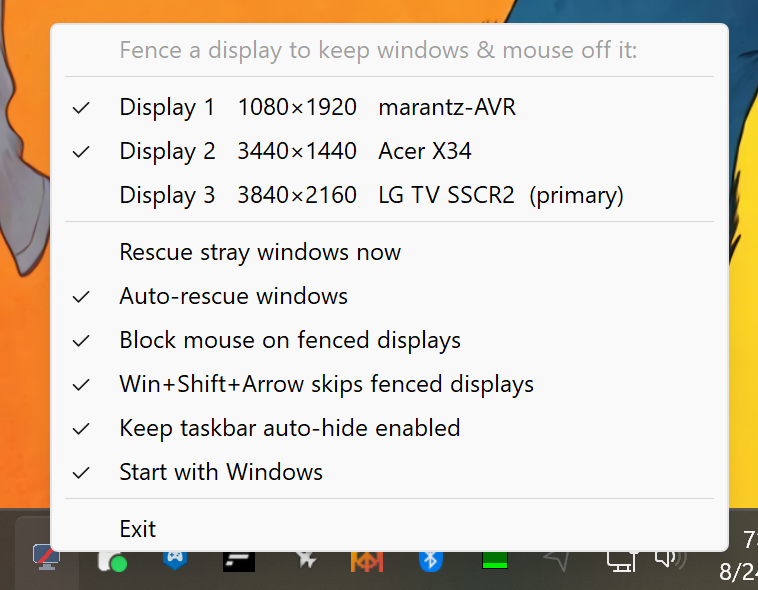
Phantom Fence solves this without touching your audio. Pick the phantom display from the tray menu and it's fenced off:
This can also be used for anyone who has secondary monitors turned off that they don't want Windows to place any applications on, or to rescue any applications that get orphaned on a monitor.
- Any window that opens on or moves to the fenced display is instantly moved back to a real monitor — and intelligently resized to fit, so portrait-squished windows come back at a sensible size.
- Your mouse cursor can't cross onto the fenced display. It slides naturally along the boundary instead of getting lost.
- Win+Shift+Arrow window moves skip the fenced display entirely.
- The display itself stays enabled, so HDMI/receiver audio keeps working exactly as before.
Lightweight by design: a single small executable, no background services, no network connections, no data collection. Fenced displays are remembered across reboots and driver updates. Runs at startup (manage in Settings → Apps → Startup) and stays out of your way in the system tray.
Perfect for home-theater PCs, AV receivers used as audio-only outputs, and any setup with a "ghost monitor" you can't get rid of.
Purchase
In order to download this tool you must purchase it at or above the minimum price of $2.99 USD. You will get access to the following files:
Also available on

Leave a comment
Log in with itch.io to leave a comment.